
As you may have seen in our last article, we're big believers in open-source LLMs. The benchmarks are there, the economics are there, and for the vast majority of business use cases, open models get the job done without sending your data to a third party.
But to run open-source LLMs, you need hardware. So what are the options?
Here's a fact that doesn't get enough attention: you can buy a silent, 7.7-inch desktop computer with 256GB of AI-usable memory for $6,000.
To get the same amount of memory on NVIDIA hardware, the kind every AI company in the world is fighting over, you'd spend $17,000 to $120,000. For the same amount of memory.
This is a pricing anomaly in the AI hardware market, and most people haven't noticed yet.
The core argument: price per gigabyte
The single most important resource for running large AI models locally is memory. Not compute speed. Not CUDA cores. Memory. If a model doesn't fit in memory, it doesn't run. Period.
Why does 256GB matter? Because that's the threshold where the most capable open models become available to you. The best open-source models today, the ones that compete with GPT-4o and Claude, have 70 to 400+ billion parameters. A 70B model needs about 40GB at 4-bit quantization. A 400B Mixture-of-Experts model needs 150–200GB. The full DeepSeek R1 at 671B parameters needs over 400GB. At 256GB, you can comfortably run every 70B model at high quality, fit the massive MoE models that punch well above their weight, and even squeeze in quantized versions of the 400B+ class. Below 256GB, you're leaving the best models on the table. Above it, you're into diminishing returns (or chaining multiple machines together).
The Mac Studio's unified memory architecture means all of its RAM is directly accessible by the GPU. It is VRAM. A typical NVIDIA GPU has 24GB of VRAM (RTX 4090) or 48GB (RTX A6000). To get to 256GB, you'd need to buy and wire together multiple cards. The Mac Studio ships as a single, silent box. Here's what it costs across every option available today:
| Configuration | Total VRAM | # Cards | GPU Cost | $/GB |
|---|---|---|---|---|
| 🍎 Mac Studio (M3 Ultra, 256GB) | 256 GB | — | $6,000 | $23/GB |
| 11× Tesla P40 24GB (used, 2016 era) | 264 GB | 11 | ~$2,200 | $8/GB |
| 6× RTX A6000 48GB (used) | 288 GB | 6 | ~$15,000 | $52/GB |
| 4× A100 80GB (used) | 320 GB | 4 | ~$24,000 | $75/GB |
| 8× RTX 5090 32GB (new) | 256 GB | 8 | ~$30,400 | $119/GB |
| 3× RTX 6000 Pro 96GB (new) | 288 GB | 3 | ~$25,500 | $89/GB |
| 4× H100 80GB SXM (new) | 320 GB | 4 | ~$112,000 | $350/GB |
Yes, the Tesla P40 is technically cheaper per-GB. It's also a 2016 datacenter card with no FP16 tensor cores and passive cooling that requires a server chassis. Inference is roughly 8× slower. You'd need 11 of them, a dual-socket server, custom cooling, and 2,750W of power draw just for the GPUs. Fun eBay project. Not a production setup.
Among modern, actually usable hardware, the Mac Studio is 2 to 15× cheaper per gigabyte than anything else on the market.
What does that memory actually buy you?
This is the question that makes the price comparison matter. Cheap memory is only interesting if you can do something with it. In 2026, you can run shockingly capable AI models.
The Mac Studio comes in several configurations. Here's what fits at each tier, the quality you get, and how fast it runs:
The lineup
| Config | Chip | Memory | Price |
|---|---|---|---|
| Entry | M4 Max (14c CPU, 32c GPU) | 36 GB | $1,999 |
| Mid | M4 Max (16c CPU, 40c GPU) | 48–64 GB | $2,399–$2,599 |
| Sweet Spot | M4 Max (16c CPU, 40c GPU) | 128 GB | ~$3,399 |
| Pro | M3 Ultra (28c CPU, 60c GPU) | 96 GB | $3,999 |
| Power | M3 Ultra (32c CPU, 80c GPU) | 256 GB | ~$6,999 |
Note: Apple recently discontinued the 512GB configuration and raised the price of the 256GB upgrade, likely due to memory supply constraints. Prices as of April 2026.
What runs at each tier
| Memory | Notable Models That Fit | Quality Level | Speed |
|---|---|---|---|
| 36–48 GB | Gemma 4 31B, Gemma 4 26B-A4B (MoE), Qwen3 14B, DeepSeek-R1-Distill-14B, Llama 8B | Good for focused tasks. Gemma 4 31B is ranked #3 open model on LMArena. Runs in 20GB at 4-bit. | 30–50 tok/s |
| 64 GB | Qwen3 32B (Q4), DeepSeek-R1-Distill-32B, Gemma 4 31B (Q8, higher quality) | Strong reasoning. Approaches GPT-4 on many tasks. | 15–22 tok/s |
| 96–128 GB | Llama 3.3 70B (Q4–Q8), Qwen3.5-122B-A10B, GPT-OSS-120B | Matches or exceeds GPT-4o for many use cases. | 10–18 tok/s (dense) 25–40 tok/s (MoE) |
| 256 GB | Qwen3.5-397B-A17B, Llama 4 Maverick, Llama 405B (Q4) | Frontier-competitive. These are the models we run in production. | 15–30 tok/s (MoE) 4–8 tok/s (dense 405B) |
Read that again. A $3,400 desktop runs 70B-parameter models that match GPT-4o. A $7,000 desktop runs 400B-parameter Mixture-of-Experts models that compete with frontier APIs. Eighteen months ago, these models required datacenter hardware to even load.
Real benchmarks, real hardware
These aren't theoretical. Here's what the community and our own fleet are actually seeing:
- DeepSeek R1 671B (Q4) on M3 Ultra 512GB: 6.4 tok/s generation, 60 tok/s prompt processing via MLX. This model needs 8× H100s ($250K+) on NVIDIA. It ran on a $10K desktop.
- DeepSeek V3 0324 (4-bit) on 512GB: >20 tok/s. Fast enough for interactive use of one of the most capable open models in the world.
- Qwen3.5-397B on 256GB: 15–30 tok/s in MoE mode. This is what we actually run in production at GXB, serving inference for client projects through our internal API.
- Llama 3.3 70B (Q4) on M4 Max 128GB: 12–15 tok/s. Comfortable conversational speed. Quality that matches GPT-3.5 and approaches GPT-4 depending on task.
- Qwen3 32B on 48GB: 15–22 tok/s. The sweet spot for a Mac Mini M4 Pro at $1,799. An $1,800 computer running a model that approaches GPT-4 quality.
How local models compare to cloud APIs
The gap is closing fast:
- Gemma 4 31B (released yesterday, April 2) is the #3 ranked open model in the world on LMArena, outcompeting models 20× its size. It fits on a $2,000 Mac Studio in 20GB at 4-bit.
- Qwen3.5-35B (with only 3B active parameters) now surpasses last-generation Qwen3-235B on benchmarks. Smaller, faster, smarter.
- Qwen3.5-27B (a dense model) ties GPT-5 mini on SWE-bench, a standard coding benchmark.
- Developers running 256GB Mac Studios describe using local models with coding assistants as "the same as Claude in Cursor, except slightly slower and shorter context."
- A $5,000 Mac Studio pays for itself in months compared to API costs, and the hardware lasts for years.
Local models aren't trying to beat frontier APIs at their best. They're trying to be good enough for 90% of tasks at zero marginal cost. In 2026, they are.
Total system cost: not just GPUs
The VRAM comparison above only covers GPU costs. GPUs don't float in space. They need a system around them. Here's what a complete, functional setup costs for each configuration:
| Configuration | GPU Cost | System Cost | Total | vs. Mac Studio |
|---|---|---|---|---|
| 🍎 Mac Studio 256GB | — | — | $6,000 | 1× |
| 11× Tesla P40 server | $2,200 | $1,800 | ~$4,000 | 0.7× (but 8× slower) |
| 6× RTX A6000 workstation | $15,000 | $2,500 | ~$17,500 | 2.9× |
| 4× A100 80GB server | $24,000 | $3,000 | ~$27,000 | 4.5× |
| 8× RTX 5090 (2 machines) | $30,400 | $5,000 | ~$35,400 | 5.9× |
| 3× RTX 6000 Pro workstation | $25,500 | $2,500 | ~$28,000 | 4.7× |
| 4× H100 SXM server | $112,000 | $8,000 | ~$120,000 | 20× |
For every dollar you spend on a Mac Studio, you'd need to spend $3–5 on modern NVIDIA GPUs to get the same amount of AI-usable memory. $20 if you want datacenter-grade hardware.
Inference speed: where Macs shine
For running large models (70B+ parameters, the kind that only the Mac can fit in a single system at this price), here's how the options stack up:
| Setup | Llama 70B Q4 (tok/s) | Fits in memory? | Total Cost |
|---|---|---|---|
| 🍎 Mac Studio 256GB | 12–18 | ✅ Easily | $6,000 |
| 2× RTX 4090 build | 25–35 | ⚠️ Tight (48GB) | ~$7,000 |
| 2× RTX 5090 build | 40–55 | ✅ (64GB) | ~$11,000 |
| 1× A100 80GB server | 30–50 | ✅ | ~$9,000 |
| 1× H100 80GB server | 40–80 | ✅ | ~$30,000 |
The Mac isn't the fastest option per-token. It gives you the most memory at the lowest price in a form factor you can put on your desk. For models that don't fit on a single GPU (70B+, 100B+, the 671B DeepSeek models), the Mac is often the only option under $20K.
Training speed: a different ballgame
Everything above is about inference: the day-to-day work of asking an LLM questions, generating content, running agents. That's what most people and most businesses actually do with AI.
Training is a completely different story. When you're training a foundation model or doing heavy fine-tuning, runs take weeks to months. A 10× speed boost actually matters when it's the difference between a two-week experiment and a five-month one. NVIDIA wins here, decisively.
| Hardware | FP16 TFLOPS | Relative Training Speed | Cost |
|---|---|---|---|
| 🍎 Mac Studio (M3 Ultra 80c GPU) | ~50 | 1× (baseline) | $6,000 |
| RTX 4090 | 330 | ~3–6× faster | $2,200 (used) |
| RTX 5090 | ~419 | ~4–8× faster | $3,800 |
| A100 80GB | 312 | ~6× faster | $5,000–9,000 (used) |
| H100 80GB SXM | 989 | ~18× faster | $25,000–31,000 |
If you're building foundation models or running large-scale fine-tuning jobs, enterprise NVIDIA hardware is still the right call. That's what it was built for.
But most companies aren't doing that. They're running models, not training them. For inference, the bottleneck is memory, not compute. The Mac Studio has a structural advantage in the workload that 95% of businesses actually care about.
The one exception: you can LoRA fine-tune a 70B model on a Mac Studio because the entire model fits in memory. On an RTX 4090 with 24GB of VRAM, you can't even load it. It'll be slow, but it'll run.
The hidden costs nobody talks about
| 🍎 Mac Studio | Multi-GPU NVIDIA | H100 Server | |
|---|---|---|---|
| Power draw | ~200W | ~1,000–1,800W | ~1,200–3,000W |
| Annual electricity ($0.12/kWh, 24/7) | ~$210/yr | ~$1,050–1,900/yr | ~$1,260–3,150/yr |
| Noise | Silent. Desk-friendly. | Loud. Dedicated room. | Data center required. |
| Physical size | 7.7" × 7.7" × 3.7" | Full tower or rack | 4U rack server |
| Setup | Plug in, turn on | Multi-card wiring, cooling, PCIe config | Enterprise IT project |
| Software | MLX (growing fast) | CUDA (mature, everything) | CUDA (mature, everything) |
The electricity difference adds up. An NVIDIA multi-GPU setup costs $800–$1,700 more per year to run. Over a three-year hardware lifecycle, that's $2,400–$5,100 in costs that never show up in the GPU price comparison.
Then there's the stuff you can't put a dollar figure on. The Mac Studio sits on your desk and you forget it's there. A multi-GPU rig sounds like a hair dryer and heats your office. An H100 server needs a rack, dedicated cooling, and probably a facilities conversation with your landlord.
The software gap is closing
The one legitimate objection to the Mac platform has always been software. CUDA is the standard. Every ML framework, every tuning trick, every research paper assumes NVIDIA hardware.
That's still true, but the gap is narrowing fast. Apple's MLX framework went from "interesting experiment" to "runs every major open model" in under two years. LM Studio, Ollama, and llama.cpp all have excellent Apple Silicon support. The Hugging Face ecosystem has embraced MLX quantization.
For inference (which is what most businesses are doing), the software story on Mac is solved. You download a model, run a command, and get an OpenAI-compatible API endpoint. That's the whole setup.
We run our entire local inference fleet on Mac Studios serving MLX models through a single API. It handles concurrent requests, priority queuing, and automatic batching. No CUDA. No driver issues. No thermal throttling.
The bottom line
The Mac Studio won't beat NVIDIA on raw compute. An H100 has 18× more training throughput. A 5090 will generate tokens faster from a 7B model.
That's not the game most people are playing. Most people want to run the biggest, smartest AI models they can, without sending their data to a cloud API, at a price that makes sense.
For that game, there's nothing else like the Mac Studio:
- $6K gets you 256GB of AI memory in a silent desktop box
- $17K–$28K gets you the NVIDIA equivalent (comparable VRAM, modern cards)
- $120K+ gets you the datacenter-grade equivalent
The window is closing
The pricing anomaly won't last forever. Apple already discontinued the 512GB configuration and raised prices on the 256GB upgrade as memory costs rise. The new 256GB models now have ship dates pushed into late July and growing.
The used market tells the story even more clearly:
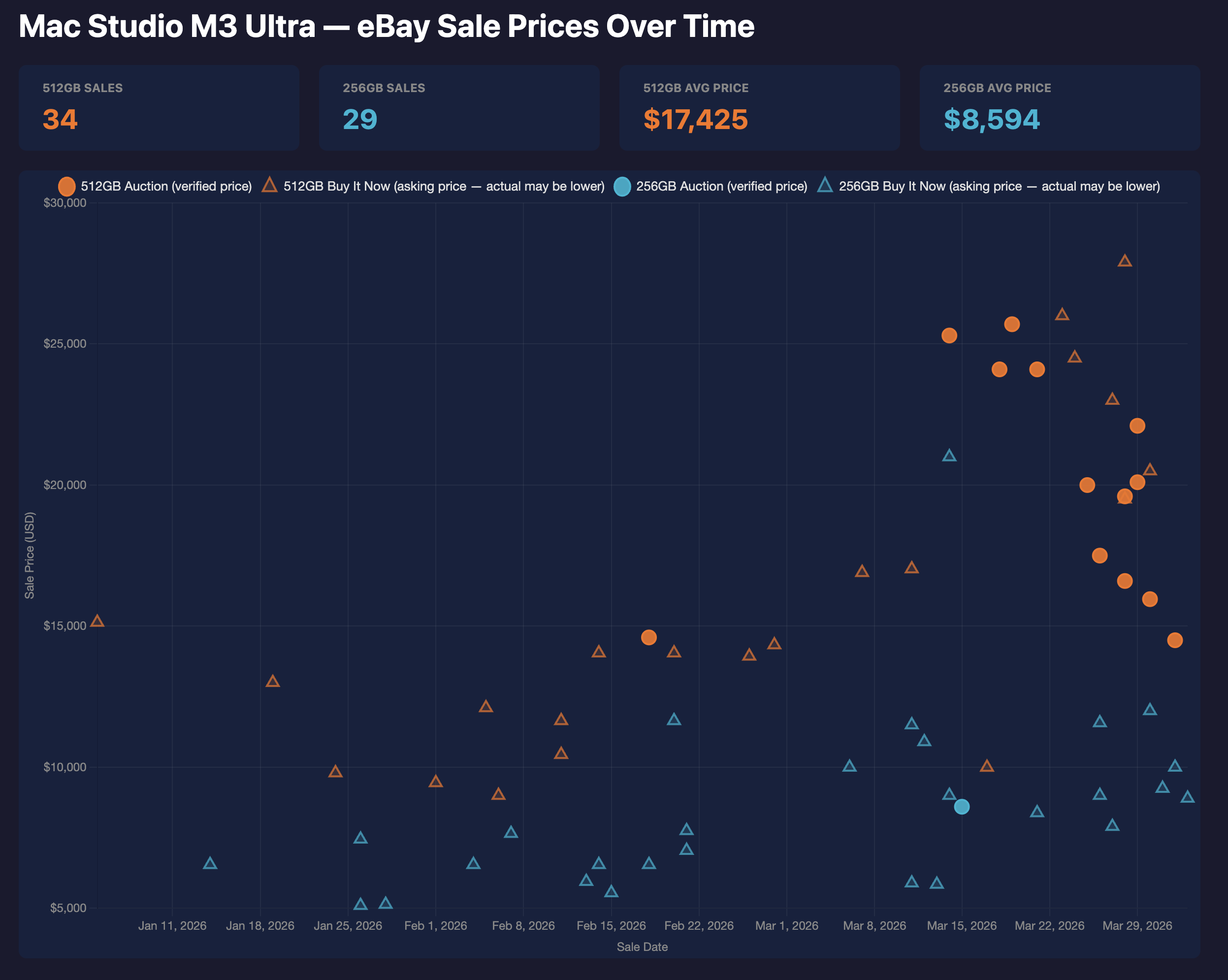
eBay sale prices for Mac Studio M3 Ultra, Jan–Mar 2026. 512GB models averaging $17,425 and climbing fast.
512GB Mac Studios that sold for $8,000–$10,000 in January are now going for $20,000–$25,000. The trend is exponential, not linear. People are figuring out what these machines can do, and supply is fixed because Apple stopped making them.
We looked at this data and bought four of the last remaining 512GB Mac Studios. There's a hard limit on chaining four of them together via Thunderbolt, which means 2TB of unified VRAM in a single cluster. That's enough to run any open model in existence at full precision, including the 1T+ parameter MoE models. Given how the secondary market is moving, this will be the cheapest way to get 2TB of VRAM for a long time.
If you're thinking about building local AI infrastructure, for your company, for your portfolio companies, or just for yourself, the current pricing is as good as it's going to get for a while.
The Mac Studio is an absurd deal on AI memory. The only question is how long it stays that way.
Data compiled April 2026. GPU prices from eBay sold listings, Amazon, and vendor sites. Benchmark data from llama.cpp community benchmarks, MLX community testing, and our own internal fleet. Mac Studio pricing from Apple.com. All prices in USD.